Stack sats on autopilot
AccBot buys Bitcoin for you on a schedule, straight from your own exchange account. It runs on your phone, so there's no cloud service and no middleman taking a cut.
Your keys stay with you
API keys never leave your phone. They're encrypted with AES-256-GCM in the Android Keystore. Nothing goes to the cloud and nothing is tracked.
Set it and forget it
Set up a plan once and AccBot keeps buying on schedule, even while your phone sits in your pocket.
Open source and free
The code is public under the MIT license. No subscription, no premium tier, no data collection. You only pay your exchange's usual trading fee.
What AccBot can do
Smart DCA strategies
Pick the strategy that suits you. Classic DCA buys the same amount every time. ATH-based DCA buys more the further the price drops below its all-time high. Fear & Greed DCA follows market sentiment and buys more when others panic.
Portfolio overview
Interactive charts show what you hold, how much you've made and how each plan is doing. See your average buy price and today's value, per exchange and per trading pair.
Purchase history and CSV export
Every purchase in one place, filterable by coin, exchange and status. Export it to CSV for your tax return or your own spreadsheets.
Sandbox mode
Try everything on the Binance spot testnet without risking real money. Test plans, orders and keys are kept completely separate from your real ones.
Withdrawal reminders
Set a balance limit and AccBot reminds you when it's time to move your coins from the exchange to your own wallet.

Set up with a QR code
Scan API keys and wallet addresses with your camera instead of typing long strings of characters by hand.
Point the camera at the QR code
7f3a…4f60Encrypted backup
Back up your plans, purchase history and, if you like, your API keys with a single tap. The backup is encrypted with your password using AES-256-GCM. Moving to a new phone takes a few seconds, and you don't need an account.
And a few more things
Limit sells
Place limit sell orders on Coinmate and Binance right from the app (Android).
Import past trades
Bring in earlier purchases through the exchange API or a CSV file, so your stats start from day one.
Read-only plan sharing
Show a plan to your partner or a friend. Send a snapshot, or live updates with a separate read-only key. They can look, but they can't trade.
Automation check
AccBot keeps an eye on battery optimization, exact alarms and notifications, and tells you how to fix anything that could stop a purchase.
See it in action
Real screenshots from the Android app.
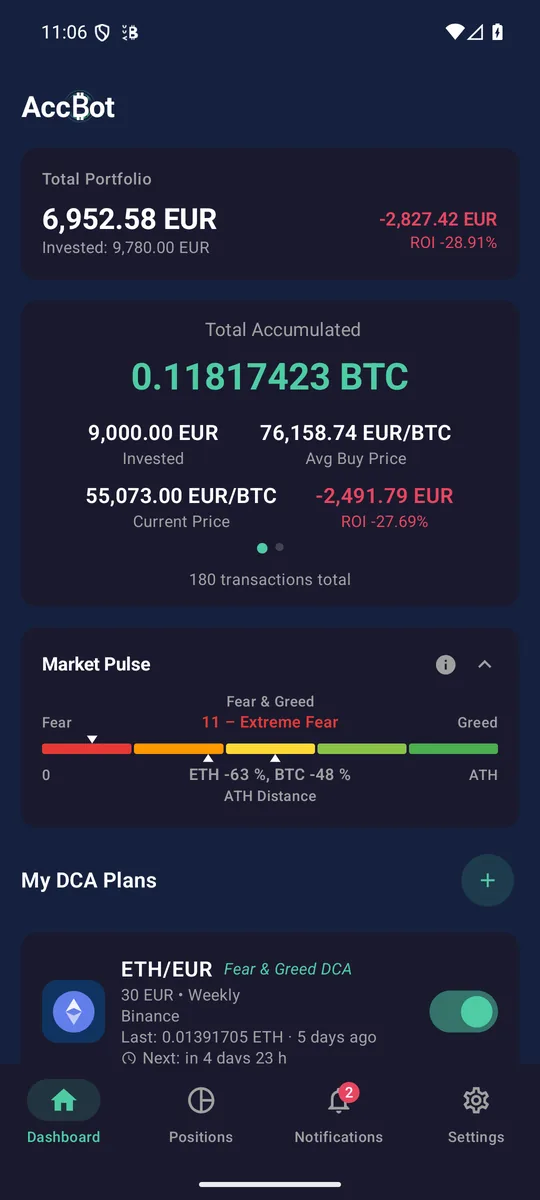
Dashboard with your plans and market mood
Supported exchanges
Run DCA plans on five exchanges. On Android you can also place limit sells on Coinmate and Binance.


| Exchange | Spot testnet | Limit sells (Android) | Trade import |
|---|---|---|---|
| Binance | Yes | Yes | API |
| Coinmate | No | Yes | API, CSV |
| Kraken | No | No | API |
| KuCoin | No | No | No |
| Coinbase | No | No | API |
Security comes first
AccBot has no server of its own. Everything happens on your phone, and your data stays there.
How it works
Connect
Create an API key on your exchange with trading permission only, then scan its QR code or paste it in.
Set up a plan
Choose the coin, amount, frequency and strategy: Classic, ATH-based or Fear & Greed.
Stack
AccBot buys in the background on your schedule, and you follow the results in your portfolio.
AccBot vs Štosuj
Štosuj, a popular Czech DCA service, charges 1.5% on every purchase on Coinmate. With AccBot you buy on Coinmate directly and pay only the exchange's standard 0.6% taker fee. See what that adds up to over time.
Frequently asked questions
Is AccBot really free?
Yes. AccBot is open source under the MIT license and costs nothing. There's no subscription and no extra fee on your purchases. You only pay your exchange's normal trading fee.
Can AccBot withdraw or lose my money?
AccBot only works with the API key you create on your exchange. Give the key permission to trade and leave withdrawals turned off. The key is stored encrypted on your phone, and AccBot only ever sends it to your exchange.
Does my phone need to be on?
Yes. Purchases run on your phone, so it needs to be switched on and online. Android sometimes delays background tasks by a few minutes. If a purchase is missed, for example while the phone was off, AccBot shows it on the dashboard and lets you buy it later or skip it.
Where are my coins kept?
Purchased coins land in your exchange account. AccBot can remind you when your balance reaches a limit you choose, so you can move it to your own wallet.
Which coins and currencies are supported?
You can buy BTC, ETH, SOL, ADA, DOT, LTC and BNB with EUR, USD, GBP, CZK, USDT or USDC. What's available depends on your exchange.
Is there an iPhone version?
The iOS app is in the works. For now AccBot is available for Android on Google Play and GitHub.
Can I try it without real money?
Yes. Turn on sandbox mode and AccBot trades on the Binance spot testnet with test funds.
Support AccBot
AccBot is free and we build it in our spare time. If it helps you stack, here's how you can help us back.
Send sats over Lightning
Instant and almost free. Scan the QR code in a Lightning wallet or copy the address.
[email protected] Send crypto
Scan the QR code in your wallet or copy the address.

bc1q2hz79m4csklecqgusu9e2yjnrr6e9ca6nhu0at Other ways to help
- Star us on GitHubA star helps other people find the project.
- Rate the appA short review on Google Play makes a big difference.
- Report bugs and ideasFound a bug or missing a feature? Open an issue, or send us a pull request.
- Follow AccBot News, tips and help from the community.
Start stacking today
Available for Android. Free and open source.